How to transfer Telegram group Ownership
How to transfer Telegram group ownership
As we all know, there are many different messaging applications available today. Telegram is one of the most well-known ones, competing with Facebook, WhatsApp, and many more. The capabilities of this Telegram chat app are quite helpful. Brothers Nikolai and Pavel Durov created it.
A few improvements to Telegram that were made available to iOS and Android users last year included, among other things, the option to transfer group ownership.
Through this function, admin has the ability to quickly transfer control of a group or channel to another administrator ID.
We'll walk you through the process of transferring ownership to other users in this post, step by step.
stipulation for transferring telegraph ownership to others
Giving another user control of the Channel or group is a Telegram group.
Step 1: Open the Telegram app and then click on the channel you want to transfer the ownership to.
Step 2: Once you are within the channel, click the name and select the “Edit” in the top right corner.
Step 3: Go to Administrators > Add Admins

Step 4: Now, it’s time to choose the member to whom you want to transfer the “Channel” ownership in Telegram.

Step 5: “Add New Admins” toggle. You will get the option “Transfer Channel Ownership” right below.
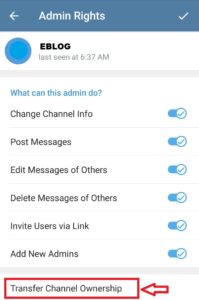
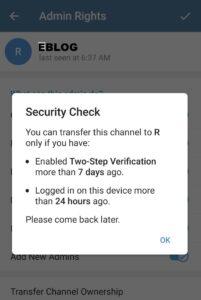
Step 6: Click on “Change Owner”.
Step 7: Now, Enter the Two Two-Step Verification password.
Step 8: Ownership transfer is done!
The procedure remains the same for transferring ownership in ‘Group’ as well. But we have again explained it below for your reference.
Comments
Post a Comment